iPhone Duo: is your iPhone or iPad app ready for Apple's first foldable?
· 16 min read
On October 23, Apple starts selling iPhone Duo, its first foldable iPhone, at $1,999 and up. Your app will run on it from day one, even if nobody touches the code. What it will look like is another matter. An app that has not been rebuilt opens on the big inner screen as a narrow, iPhone-shaped column with black bars down both sides, and the person holding it has just paid at least $1,999 for that screen.
This is for companies and founders who already have an iPhone or iPad app, or are about to commission one. It covers what changes on iPhone Duo, what "optimized" means in practice, whether the work is worth paying for, how likely Apple is to put your app in front of buyers at launch, and what to do before October 23. You do not need to read code to follow it. There is a free technical guide for your developers at the end.
The short version. Your current app runs on iPhone Duo with no update, in a compatibility mode that puts black bars on the big inner screen. Rebuilding it with Xcode 27.1 gives it the whole display and the new side controls. If it already adapts well to iPad, most of the groundwork is done. Apple's tools are out, and App Store Connect has accepted apps built for iPhone Duo since October 5. The phone goes on sale October 23, and only the apps that are ready by then have a chance at launch coverage from Apple.
iPhone Duo at a glance
| Details | |
|---|---|
| Availability | Pre-orders from October 16, 2026. In stores October 23 in more than 70 countries and regions, and in 28 more on October 30. |
| Price | From $1,999 (256 GB) to $3,199 (2 TB) in the US |
| Screens | A 5.4-inch outer display when closed, a 7.6-inch folding display when open |
| Software | Ships with iOS 27.1 |
| Multitasking | Two apps side by side, two windows of the same app, and a video pinned to the top of the screen while you use another app |
| Cameras | A 48 MP dual rear camera and two front cameras, one of them under the inner display. The outer screen can show a live preview to the person being photographed. |
| Apple Pencil | Supported on both screens later this year |
For anyone who owns an app, the change that matters most is not in that table. On iPhone Duo, apps built with the iOS 27.1 SDK get a different arrangement. When the phone is closed, and when it is open and held sideways, the back button, the toolbar and the tab bar leave the top and bottom of the screen and line up in a column on the right, under the status bar. Your content keeps everything to the left of it, and the controls sit under your right thumb. Open the phone and hold it upright, and the big screen goes back to the familiar bars at the top and bottom. Apple's press release names Netflix, Zoom and Slack as third-party apps already built for the folding design, and a photo caption adds a fourth, Detail.
What happens to your app if you do nothing
How much of the screen your app gets on iPhone Duo depends on one thing: the version of Apple's developer tools, the SDK, that your app was last built with.
| Your app was last built with | What iPhone Duo owners see |
|---|---|
| An SDK older than iOS 27 | What 9to5Mac calls a compatibility mode. Closed, the app uses the screen to the left of the strip that holds the status bar and camera. Open, it keeps its familiar iPhone size and shape in the middle of the 7.6-inch screen, with black bars on both sides. |
| The iOS 27 SDK | The whole inner screen except the status bar strip on the right. The controls stay in their usual bars. |
| The iOS 27.1 SDK (Xcode 27.1) | The whole display, edge to edge. Standard navigation and toolbar buttons move into the column under the status bar. |
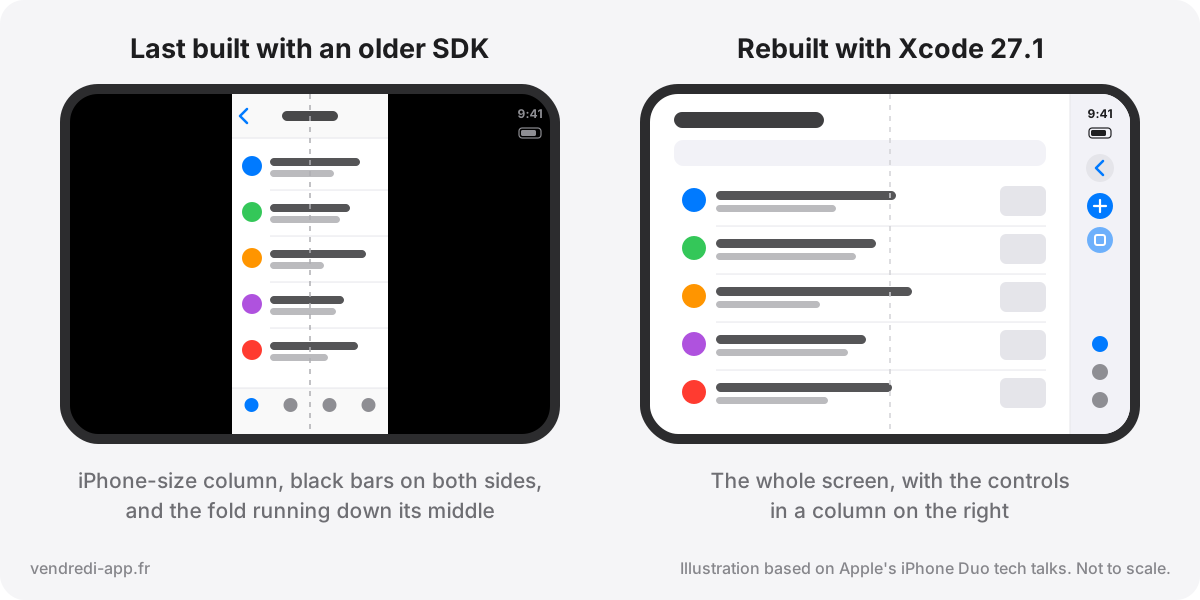
Working and looking right are two different things. On a 7.6-inch screen a narrow column looks like a bug, and the first people to see it are the ones who paid for the big screen. AppleInsider's headline on announcement day was blunt: apps will look terrible unless they are updated. Its own nuance is fair. On the outer screen they display reasonably, and it is the opened-up inner screen where they look poor.
Rebuilding is not the end of it either. Once your app has the whole screen, it has to resize live every time someone opens, closes, rotates or folds the phone. The trouble shows up in screens designed around a fixed width or a single orientation: buttons pushed off the edge, text overlapping, stretched images.
Is it worth optimizing for a $2,000 phone?
Fair question. For a while, iPhone Duo will be a small slice of the iPhone market.
Look at who buys it first. At $1,999 and up, early owners will mostly be early adopters and people who run a good part of their working life from their phone. They try new apps early and are used to paying for software they rely on. If your business runs on subscriptions or on professional users, that is the audience you want to impress.
Then there is the launch itself. New hardware is when Apple, the press and buyers all go looking for apps that make it look good, and Apple's part in that gets its own section below. An app that is ready on day one gets looked at. An app with black bars gives its users a reason to try a competitor.
The work also pays off beyond this one phone. The same flexible layouts serve iPad, the iPhone Mirroring window on the Mac (which macOS 27 lets people resize into new shapes for the first time), and whatever screen size Apple ships next. Plenty of apps needed layouts that adapt to any screen long before there was a foldable. iPhone Duo puts a date on it, and so does Apple: from April 2027, every iPhone app uploaded to App Store Connect has to be built with the iOS 27 SDK or later, so the rebuild is coming either way.
It can wait if your users are unlikely to own a $2,000 phone: children's apps, casual free games, utilities funded by ads. Do the baseline update below, move on, and keep the bigger work for later.
What "optimized for iPhone Duo" means, in four levels
Not every app needs all of it. It helps to think in levels and decide how far you want to go.
| Level | What your users get | Who needs it |
|---|---|---|
| 1. Baseline | The app fills the screen and adapts cleanly when the phone opens, closes, rotates or folds. | Every app |
| 2. Native feel | Toolbars and tabs move to the side correctly, buttons stay out of the fold, and nothing important is buried in an overflow menu. | Every app with a toolbar or a tab bar |
| 3. Big-screen layouts | The inner screen shows more than a stretched phone: a list next to its details, a sidebar, two panes that respond to the fold, and Split View next to other apps. | Content, productivity, business, media and pro apps |
| 4. Duo-only features | Things no other phone can do: a teleprompter or a "you are live" indicator on the outer screen while filming, a tabletop mode for video calls, recipes or workouts, the hinge as a control, Apple Pencil support. | Camera, video and creative apps, and any app that wants to be featured |
Level 1 starts with rebuilding the app in Xcode 27.1 and running it in Apple's iPhone Duo simulator, which comes with Xcode 27.1 and can open, close, rotate and fold a virtual device. Xcode 27.1 also gives its coding assistant a skill for this: ask it to "get my app ready for iPhone Duo" and it scans the project for the usual resizing mistakes. Apple says it finds most of them, not all. For a native app built from Apple's standard components, this is mostly checking, plus a few targeted fixes. Apps with fixed-width screens or navigation drawn by hand take longer, and so do apps locked to portrait, because the inner display ignores the orientations an app says it supports.
Level 2 is where most of the visible polish comes from. The system moves standard toolbars and tab bars to the side by itself, but the result depends on details. Items too wide for the column, such as a text button or a segmented control, are meant to stay in the bar at the top, and your developers decide that item by item. Every button needs a title as well as an icon, because items pushed into the overflow menu show both. Your app also has to tell the system which buttons matter most when space runs out. Bars your developers built from scratch do not move at all.
Level 3 is a product decision as much as a technical one. On the inner screen, Apple's own apps show a list and its details side by side, or swap the tab bar for a sidebar. Half-fold the phone like a book and the hinge divides the screen into separate regions. Stand it on a table and Apple suggests the top region for content people watch from a distance and the bottom one for the controls they touch. Its design guidance is to keep interactive elements out of the curve, which is the polite way of saying that a button in the crease is a mistake.
Level 4 is how you get noticed. Apple's own camera features use the outer screen to show people a live preview while they pose, or play Peanuts animations to catch a child's attention. Your app can do the same kind of thing with its own content, and this is the level that gives Apple's editors something to write about.
Will Apple feature your app on launch day?
It is a reasonable hope, because Apple has a habit of promoting the apps that are ready for new hardware. In November 2017, a day before iPhone X went on sale, the App Store opened a "Great on iPhone X" section full of apps already updated for the new screen, Citymapper, CARROT Weather and Netflix among them. When Apple Vision Pro shipped in 2024, Apple's newsroom announced more than 600 apps and games built for it the day before. The iPhone Duo press release already follows the pattern.
Two caveats. Apple has not announced an iPhone Duo section on the App Store. Its preparation page does ask developers to send a featuring nomination saying the app is optimized for iPhone Duo. That is a strong hint, and still not a promise. And the press release is closed: those apps were lined up long before September 9. What is still open is the App Store itself, meaning the Today stories, collections and banners Apple's editors put together once a device is in people's hands. To be considered there, the optimized version has to be live when the editors are choosing, which means on October 23 or very close to it. An app that shows black bars on the inner screen is not a candidate, however good it is elsewhere.
Your odds are better than on an ordinary day, for one plain reason: the pool is small. Normally your app is one of about 2.5 million competing for six Today stories a day. In the week of October 23, the candidates for an iPhone Duo story are the apps that were rebuilt and tested in the few weeks since Xcode 27.1 arrived. Nobody outside Apple can put a number on that, and I will not pretend to. It is still one of the rare weeks when being early counts for more than being big.
Tell Apple before the build is finished. Since 2024, App Store Connect has had Featuring Nominations, a form where you nominate an app launch, new content or an app enhancement. The last one is the type that fits an iPhone Duo update. Apple's two pages on it disagree about notice. One asks for at least two weeks and suggests up to three months for wider consideration, the other recommends a minimum of three weeks. Plan on three. For an update shipping on October 23, that meant sending it by October 2. If that date has passed, send it anyway. Apple's iPhone Duo preparation page asks developers to use the Helpful Details section to say the app is optimized for iPhone Duo and supports every pose. A nomination can carry up to five links, a public TestFlight link included, so an editor can try the iPhone Duo version before it is out. Say in a few concrete sentences what the app does on iPhone Duo that it could not do before.
Apple publishes what its editors weigh: user experience, design, innovation, uniqueness, accessibility, localization and the product page. Its definition of innovation, "new technologies that solve a unique problem", reads like a description of a good level 4 feature. Accessibility and localization are simply work, which makes them the two criteria you can be certain of meeting. Since October 5, App Store Connect takes iPhone Duo screenshots and app previews, and its new preview tool shows your product page on the device, along with the new header and search results assets. From April 2027 every submission has to include iPhone Duo screenshots, so they are worth making now. Apple Pencil support, also promised for later this year, will give note-taking and drawing apps a second chance.
Keep the expectation honest. A feature is a spike, usually one very good week, and what makes it worth having is what it leaves behind: downloads and ratings that keep accumulating after the week is over. Being ready on October 23 will not get you featured by itself. It only puts you on the list Apple can choose from, and on that date the list will be short.
Already have an iPad app? You are ahead
If your app already runs well on iPad, a good part of the hard work is done. Open, iPhone Duo's inner screen reports the same regular width and height as an iPad, so layouts that respond to those size classes, such as sidebars and split views, carry over. Apple has also confirmed that apps supporting several windows on iPad support them on iPhone Duo, with one difference: new windows cannot be opened on the outer screen.
Three things still need attention. iPhone Duo runs the iPhone version of your app, not the iPad one, and the closed outer screen is a phone that gets phone layouts, with the controls moved to the side there as well. If your code picks the iPad layout because the device is an iPad, iPhone Duo will never see it, so the layout has to follow the space available rather than the device name. And no iPad has a crease: anything that sits in the middle of the screen ends up in the fold when the phone is half open.
Planning a new app? Build for every screen from the start
- Design for two widths rather than a list of devices. A compact layout for phone-sized screens and a regular one for big screens covers iPhone, iPad and both iPhone Duo displays.
- Use Apple's standard navigation. Apps built from Apple's native components get the side controls and the new sheet behavior with no extra work, and bars you build yourself get neither.
- Check what your framework draws. Some cross-platform frameworks draw their own navigation bars, which miss the automatic iOS behavior, so you either wait for the framework to catch up or pay for custom work. I have written separately about native versus cross-platform.
- Budget one iPhone Duo test pass per release. The simulator makes it cheap to try every pose before you ship.
- If the app involves the camera, video or content creation, plan one experience that uses both screens. That is the part Apple's editors will look for.
Timeline: what to do before October 23
| Date | What happens | What to do |
|---|---|---|
| Now | Apple's six iPhone Duo tech talks and its Designing for iPhone Duo guidelines are online | Check which SDK your current release was built with, and list the screens most likely to break when resized |
| September 18 | The Xcode 27.1 beta arrives with the iPhone Duo simulator | Run the app in every pose and fix what breaks |
| October 2 | Three weeks before launch, the notice Apple recommends for a Featuring Nomination | Missed it? Send the nomination anyway |
| October 5 | App Store Connect accepts apps built with Xcode 27.1, plus iPhone Duo screenshots and app previews, and a new preview tool shows your product page on iPhone Duo | Submit the update as soon as it is tested, and upload iPhone Duo screenshots |
| October 16 | Pre-orders open and launch coverage picks up | Have the update approved and waiting for release |
| October 23 | iPhone Duo in stores in more than 70 countries and regions | Aim to be live on the App Store with the optimized version |
| October 30 | Launch in 28 more countries and regions | Read the first reviews and crash reports from iPhone Duo owners |
| April 2027 | Uploads must be built with the iOS 27 SDK or later, and submissions must include iPhone Duo screenshots | The deadline for anyone who skipped the launch |
Apple has not set a submission deadline. Since October 5, App Store Connect has accepted builds made with Xcode 27.1, and Apple's note that day invites developers to submit their iPhone Duo apps now. App Review takes time too, so submit as soon as your testing is done and hold the release until launch day. I explain why that works in the piece on App Store review times.
Ten questions to ask your developer
- Which version of Xcode and of the iOS SDK was our current release built with?
- Have you run the app in the iPhone Duo simulator, closed and open, in portrait and landscape, and half folded?
- Does any screen assume a fixed width, a single orientation or a particular device?
- Do our toolbars and tab bars use Apple's standard components, so they move to the side on their own?
- Does every toolbar button have both an icon and a text label?
- When space runs out, which buttons go into the overflow menu first, and is that the right order?
- When the phone is half open, does any button or important content sit in the fold?
- What does our main screen look like on the 7.6-inch display: a stretched phone, or a real two-pane layout?
- Does the app work in Split View next to another app, on the right and also on the left, where its controls move to the left edge?
- For camera or video features, which front camera do we use, and do we show anything on the outer screen?
Your developers will find the APIs and design rules behind each question in my free technical guide, Preparing Your App for iPhone Duo, compiled from Apple's six iPhone Duo tech talks.
Where I can help
I have built native iOS apps since 2008. So far that is 21 native apps across 7 platforms and 47 store releases, all built and shipped by me, and you can see them on the iOS developer page.
If you want a second opinion before October 23, book a Wednesday slot. A free 20-minute call is enough to work out which level your app needs. The one-hour diagnosis goes through the app against the checklist above, and it is credited against a full day if you book one within 30 days.
iPhone Duo FAQ
Will my app work on iPhone Duo without an update?
Yes. Apps built with an SDK older than iOS 27 run in a compatibility mode. They keep their iPhone proportions and, on the large inner screen, sit in the middle with black bars on each side. Rebuilding with Xcode 27.1 lets the app use the whole display.
When is iPhone Duo released, and how much does it cost?
Pre-orders open October 16, 2026, and iPhone Duo goes on sale October 23 in more than 70 countries and regions. It starts at $1,999 in the US, for 256 GB.
Do I need a separate app for iPhone Duo?
No. iPhone Duo runs your existing iPhone app. You update that same app so it adapts to both screens.
My app already supports iPad. Is that enough?
It is a strong head start, because the open inner screen reports the same regular width and height as an iPad. It is still your iPhone app, though, so you need to check the small outer screen, the controls that move to the side, and the fold.
Can we test without buying an iPhone Duo?
Yes. Xcode 27.1 includes an iPhone Duo simulator that can open, close, rotate and fold a virtual device.
Will Apple promote apps made for iPhone Duo?
Apple has done it at past launches. The App Store opened a "Great on iPhone X" section the day before iPhone X went on sale in 2017, and Apple announced more than 600 apps built for Apple Vision Pro before it shipped. Apple has not announced an iPhone Duo section, but its preparation page asks developers to nominate their iPhone Duo update for featuring. To be in the running, have the optimized version live by October 23 and send the Featuring Nomination in App Store Connect as early as you can.
Does iPhone Duo support Apple Pencil?
Yes. Apple says Apple Pencil with USB-C will work on both screens later this year, which gives note-taking, drawing and markup apps a new audience.
Sources
- Apple Newsroom: Apple unveils iPhone Duo
- Apple: iPhone Duo
- Apple Developer: Get ready for iPhone Duo
- Apple Developer: Prepare your app for iPhone Duo (tech talk)
- Apple Developer: Design for iPhone Duo (tech talk)
- Apple Developer: Raise the bar with iPhone Duo (tech talk)
- Apple Developer: Strike a pose with adaptive layouts on iPhone Duo (tech talk)
- Apple Developer: Leverage multiple displays and scenes on iPhone Duo (tech talk)
- Apple Human Interface Guidelines: Designing for iPhone Duo
- Apple Developer News: App Store submissions now open for the latest OS releases (April 2027 SDK requirement)
- Apple: App Store Connect release notes (iPhone Duo screenshots and app previews)
- Apple: Getting featured on the App Store
- Apple: Nominate your app for featuring (App Store Connect Help)
- Apple Developer News: Submit your updated apps for iPhone X (October 2017)
- MacRumors: iPhone X apps now widely rolling out on App Store ahead of device's launch (2017)
- Apple Newsroom: Apple announces more than 600 new apps built for Apple Vision Pro (2024)
- 9to5Mac: How iPhone Duo treats apps not optimized for the foldable display
- 9to5Mac: Apple launches iPhone Duo developer resources ahead of October release
- AppleInsider: Apps will look terrible unless they are updated for the iPhone Duo
- MacRumors: iPhone Duo will ship with iOS 27.1
- MacRumors: iPhone Duo pricing, pre-orders and release date announced
- MacRumors: macOS 27 lets you resize iPhone Mirroring in new aspect ratios
- Apple Developer News: Prepare and submit your apps for iPhone Duo (October 5, 2026)
- Apple Developer: Three steps to make your app shine on iPhone Duo
- Preparing Your App for iPhone Duo: the technical guide on GitHub